


You Set the Rules. Schedule My Teachers Solves the Puzzle.
Every school’s master schedule is different.
Your specialists move between grade levels. Elementary and middle school follow different bell schedules. Teacher availability varies. Certain classes can meet only at certain times.
Schedule My Teachers turns your teachers, rooms, class sections, bell schedules, and scheduling constraints into a complete K–8 master schedule—in minutes.
You provide the people, places, periods, and scheduling requirements. The software does the work of fitting everything together.
STEP 1
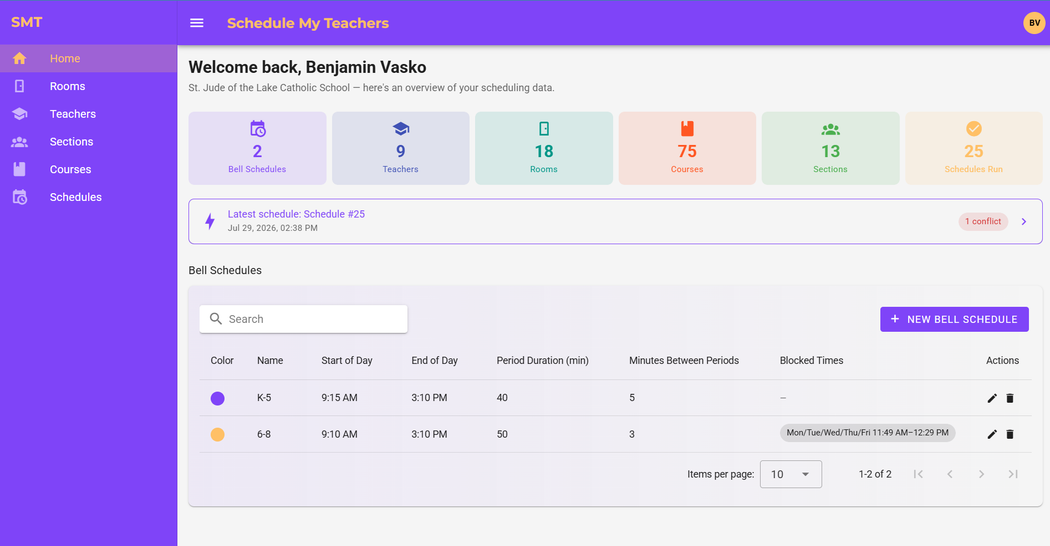
Set Up Your Bell Schedules
Set the beginning and ending times of your school day, then create the instructional periods that make up your schedule.
You can build one bell schedule for the entire school or coordinate multiple bell schedules at the same time.
That means your elementary school can use one set of class periods while your middle school uses another—and shared teachers and specialists can still be scheduled across both.
STEP 2
Add Your Teachers, Rooms, and Class Sections
Add the teachers, classrooms, courses, and class sections that need to appear in your master schedule.
Enter everything directly or save time by importing your existing information from a CSV spreadsheet. Downloadable templates make it easy to fill and upload all your data.
STEP 3
Customize Your Constraints
A teacher may be unavailable on a certain day or period. A section may need to avoid a particular time. Lunch, recess, chapel, or other schoolwide activities may block portions of the day.
Tell the software what must be true. It takes care of fitting the pieces together.
STEP 4
Click SOLVE
Once your school information and scheduling requirements are ready, click SOLVE.
Schedule My Teachers evaluates your teachers, rooms, class sections, bell schedules, and constraints and builds the master schedule for you.
The solving process typically takes 5-10 minutes.
STEP 5
Review Your Finished Schedule
Once the schedule has been solved, review the results and make sure everything works the way you want it to.
Refine the schedule further by choosing periods you want rescheduled to find a better solution. After all, you know your school best.
If the scheduler wasn’t able to find a conflict-free solution, those conflicts appear in red with a description of the error.
BONUS
Teacher Left You High and Dry? Need to Make a New Schedule?
Remove the old teacher, add the new one and their availability, and solve again.
Handle August surprises in minutes instead of starting from square one.
Try It for Yourself
Don’t purchase Schedule My Teachers based on a list of features.
Start a free trial and use your own teachers, rooms, class sections, bell schedules, and scheduling requirements.
3-DAY FREE TRIAL.
no credit card required.
From Start to Finished Schedule in an Afternoon
Every school is different, but a typical K–8 school serving approximately 150 to 450 students can build its master schedule in under four hours.
Most of that time is spent entering and reviewing your school’s information—not manually constructing the schedule.
Once everything is ready, click SOLVE and let Schedule My Teachers assemble the pieces.
No walls covered in index cards.
No spreadsheet version 47.
Just a faster path to a master schedule you can trust.
Ready to Stop Building Your Master Schedule by Hand?
Your school needs your leadership in more places than a spreadsheet.
Schedule My Teachers helps you finish your master schedule in hours instead of days, respond more easily when plans change, and send the final schedule to your staff with confidence.